[1] 5.85Exercise 2b: NBA Play-offs on Iridis
Parallel R workflows on Iridis
Now let’s move on to running our NBA playoffs exercise on Iridis.
This is a more complex example that involves both sequential and parallel elements, the results of which need to be brought back together to get a final result.
We also have nested parallelisation within our workflow.
In all honesty, our small job could easily be run using the code as is on a single node by just requesting an appropriate number of cores (8 in total).
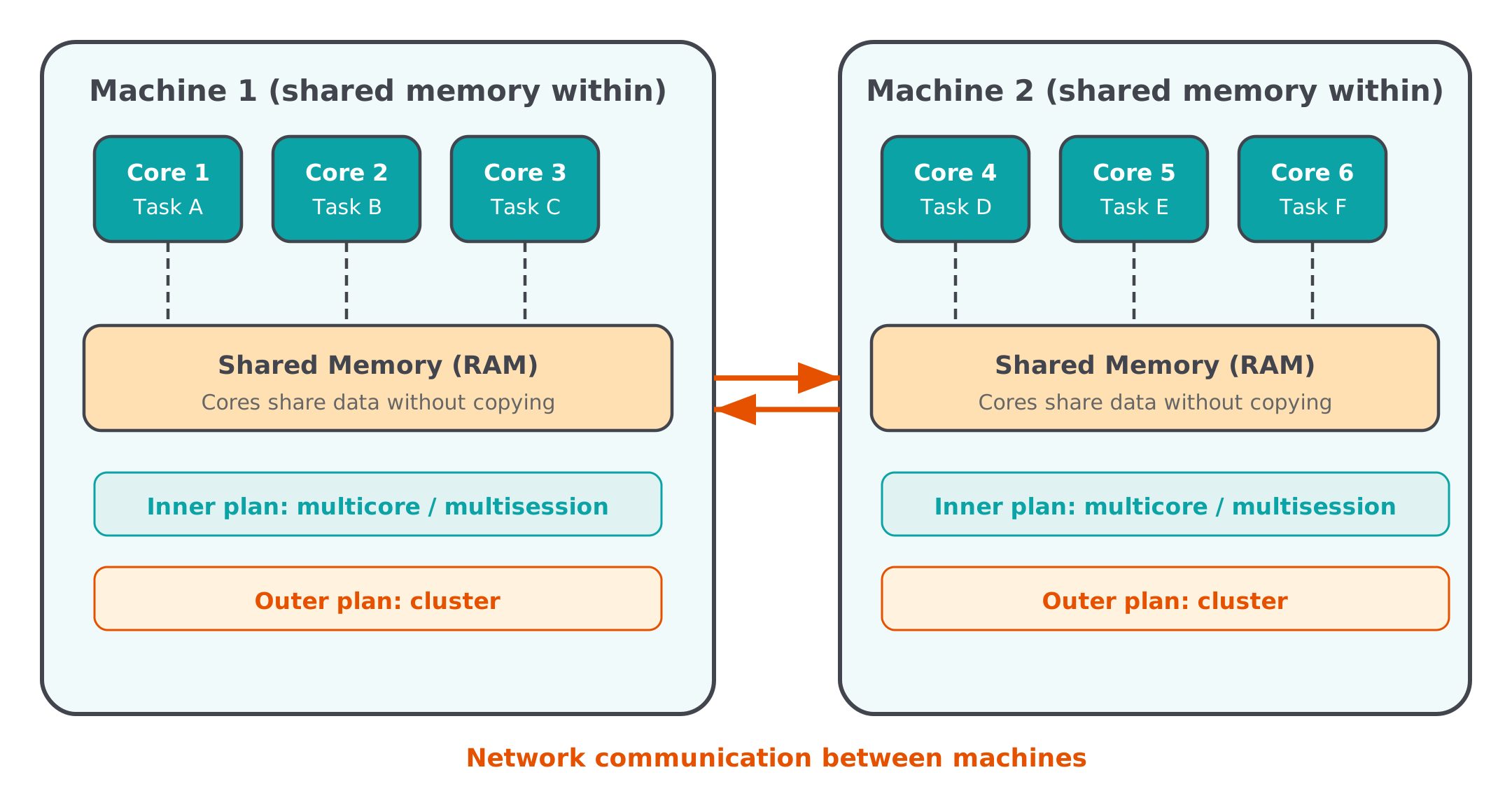
However we will take this opportunity to explore how we can deploy such non-independent jobs across multiple nodes (if necessary) and parallelise across cores within them.
This can be achieved through a job array as we’ve just seen. However that doesn’t work for inter-dependent jobs like this one (however, see the section on Job Dependency in the Iridis docs for how to set up separate jobs that depend on each others outputs).
To do so, we will be using package future.batchtools to schedule new slurm jobs from within our R script, the results of which will be returned to the main calling process when they finish.
future.batchtools
The package future.batchtools, provides a type of parallelisation that utilizes the batchtools package, which in turn provides an API for submitting jobs through to a variety of HPC back-ends, including slurm.
future.batchtools allow users to leverage the compute power of high-performance computing (HPC) clusters via a simple switch in settings - without having to change any code at all.
For instance, if batchtools is properly configured, the below two expressions for futures x and y will be processed on two different compute nodes on an HPC cluster:
library(future.batchtools)
plan(batchtools_slurm)

x %<-% { Sys.sleep(5); 3.14 }
y %<-% { Sys.sleep(5); 2.71 }
x + yImplement parallelisation through future.batchtools
First, if connected through the RStudio terminal, let’s exit Iridis to work locally:
exitNow let’s go ahead and set up our code so that the outer parallelisation layer is dispatched via future.batchtools.
Because this will cause our code to not be runnable outside of a slurm scheduling environment, let’s make a copy of
Copy nba-playoffs-future_apply.R
Let’s make a copy of nba-playoffs-future_apply.R for us to edit in the same nba/ directory and name it nba-playoffs-slurm.R.
Next, let’s start editing nba-playoffs-slurm.R.
Important
Make sure you are editing nba-playoffs-slurm.R and not nba-playoffs-future_apply.R. To be sure it might be easiest to close nba-playoffs-future_apply.R.
Modify nba-playoffs-slurm.R
Because this script will only ever run on Iridis, which is a Linux system, we can take advantage of multicore instead of multisession. As we covered earlier, multicore uses forked processes that share memory with the parent, avoiding the overhead of copying data to separate R sessions. This makes it faster, and since we’re not running in RStudio or on Windows, it’s safe to use here.
Switch qualifiers to multicore
In the qualifiers section, change:
plan(multisession)to:
plan(multicore)Replace the conference rounds nested plan with future.batchtools
Now let’s set up future.batchtools for the conference rounds. Replace:
plan(list(tweak(multisession, workers = outer_cores),
          tweak(multisession, workers = I(inner_cores))))
with:
Note we’re using multicore for the inner level here too, for the same reason.
Let’s examine what this plan is doing:
The first level of parallelisation will be handled through future.batchtools::batchtools_slurm which will submit additional slurm jobs for the outer level of parallelisation (each conference). It will therefore submit 2 additional jobs.
Each job will be submitted using a template slurm script, specified by argument template, in this case it is file nba/slurm/batchtools.slurm.tmpl. The list of values in the resources argument are passed to the template slurm script.
In this case we are asking for 4 CPU cores, 1GB of memory and 180s clock time for each additional job.
Because the next level of parallelisation will be within a separate job (likely on a separate node), we do not need to tweak multicore as it will parallelise across all available cores by default.
batchools submission templates
Let’s examine the contents of nba/slurm/batchtools.slurm.tmpl to see what it does:
#!/bin/bash

## Job Resource Interface Definition
##
## ntasks [integer(1)]:       Number of required tasks,
##                            Set larger than 1 if you want to further parallelize
##                            with MPI within your job.
## ncpus [integer(1)]:        Number of required cpus per task,
##                            Set larger than 1 if you want to further parallelize
##                            with multicore/parallel within each task.
## walltime [integer(1)]:     Walltime for this job, in seconds.
##                            Must be at least 1 minute.
## memory   [integer(1)]:     Memory in megabytes for each cpu.
##                            Must be at least 100 (when I tried lower values my
##                            jobs did not start at all).
##
## Default resources can be set in your .batchtools.conf.R by defining the variable
## 'default.resources' as a named list.

<%
# relative paths are not handled well by Slurm
log.file = shQuote(fs::path_expand(log.file))
-%>


#SBATCH --job-name=<%= shQuote(job.name) %>
#SBATCH --output=<%= log.file %>
#SBATCH --error=<%= log.file %>
#SBATCH --nodes=1
#SBATCH --time=<%= ceiling(resources$walltime / 60) %>
#SBATCH --ntasks=1
#SBATCH --cpus-per-task=<%= resources$ncpus %>
#SBATCH --mem-per-cpu=<%= resources$memory %>
<%= if (!is.null(resources$partition)) sprintf(paste0("#SBATCH --partition='", resources$partition, "'")) %>
<%= if (!is.null(resources$afterok)) paste0("#SBATCH --depend=afterok:", resources$afterok) %>
<%= if (array.jobs) sprintf("#SBATCH --array=1-%i", nrow(jobs)) else "" %>

## Initialize work environment like
## source /etc/profile
## module add ...

## Export value of DEBUGME environemnt var to slave
export DEBUGME=<%= Sys.getenv("DEBUGME") %>

<%= sprintf("export OMP_NUM_THREADS=%i", resources$omp.threads) -%>
<%= sprintf("export OPENBLAS_NUM_THREADS=%i", resources$blas.threads) -%>
<%= sprintf("export MKL_NUM_THREADS=%i", resources$blas.threads) -%>

## Run R:
## we merge R output with stdout from SLURM, which gets then logged via --output option
Rscript -e 'batchtools::doJobCollection("<%= uri %>")'
The top part of the script are just comments about the resources arguments it accepts.
Following that you will see a familiar by now block of #SBATCH comments. What’s different though is that they include <%= ... %> snippets. These execute R code and enable populating the script through providing arguments to resources in R.
Let’s not worry about the rest for now.
The last line calls
Rscript -e 'batchtools::doJobCollection("<%= uri %>")'which is the batchtools function for collecting information and launching a slurm batch job.
Tip
For more details on how templates can be supplied see the entry for argument template in the following docs.
nba-playoffs.slurm submission file
Let’s also examine the contents of nba/slurm/nba-playoffs.slurm which is the file we will use to submit our NBA play-offs job:
#!/bin/bash

#SBATCH --nodes=1
#SBATCH --ntasks-per-node=2
#SBATCH --mem-per-cpu=500
#SBATCH --job-name=nba-playoffs
#SBATCH --time=00:03:00
#SBATCH --output=logs/R-%x.%j.out
#SBATCH --error=logs/R-%x.%j.err
#SBATCH --export=ALL,TZ=Europe/London
#SBATCH --mail-type=ALL

# send mail to this address
#SBATCH --mail-user=youremail@here.com

module load R/4.5.3-gcc8
module load openmpi/5.0.9_gcc15

cd parallel-r-materials/
Rscript nba/nba-playoffs-slurm.R
This should be pretty familiar to you now.
Note we are only requesting 2 cores for the initial submission node, enough to parallelise the qualifiers across conferences. The rest will be provisioned by future.batchtools.
Another thing to note is that we are not loading all the additional geospatial libraries this time as they are not required.
We are, however, loading openmpi/5.0.9_gcc15 in addition to R.
The Open MPI Project is an open source Message Passing Interface (MPI) implementation which enables information to be passed between compute nodes. While not required for running jobs on individual nodes that are independent of each other, it is required if we want jobs across nodes to communicate with each other.
Before we move on though, let’s edit the file and add a valid email address for notifications.
Run NBA Playoffs job on Iridis
Before we head over to Iridis to submit our job, let’s synch our files already on Iridis with the changes we’ve just made to our local files. As always, switch out userid with your own username.
Run the following command either in Rstudio terminal on Linux/macOS or in your local shell session on mobaXterm.
rsync -hav --exclude={'.*/','*/outputs/*'} --progress ./* userid@iridis6.soton.ac.uk:/home/userid/parallel-r-materials/Now let’s log into Iridis and submit our NBA Playoffs job!
sbatch parallel-r-materials/nba/slurm/nba-playoffs.slurmMonitor our job
Let’s use squeue to monitor our job:
squeue -lu useridFirst you will notice a single job running:
  JOBID PARTITION     NAME     USER    STATE       TIME TIME_LIMI  NODES NODELIST(REASON)
1917700     batch nba-play   ak1f23  RUNNING       0:08      3:00      1 red6083
However, eventually this will spawn another two jobs. That’s batchtools in action! The name of the job is the calling function which generated the job, in our case future_lapply.
Note as well that, in this case, the two future_lapply jobs are running on the same node (red6087). This might not always be the case — slurm may dispatch them to different nodes, which ensures that the jobs won’t stall if they can’t be executed on a single node.
  JOBID PARTITION     NAME     USER    STATE       TIME TIME_LIMI  NODES NODELIST(REASON)
1917702     batch future_l   ak1f23  RUNNING       0:01      3:00      1 red6087
1917701     batch future_l   ak1f23  RUNNING       0:01      3:00      1 red6087
1917700     batch nba-play   ak1f23  RUNNING       1:32      3:00      1 red6083
The two future_lapply jobs will eventually complete. Their results are collected by the initial job (nba-playoffs), where the overall finals will be played and the overall playoffs winner will be announced!
  JOBID PARTITION     NAME     USER    STATE       TIME TIME_LIMI  NODES NODELIST(REASON)
1917701     batch future_l   ak1f23 COMPLETI       0:14      3:00      1 red6087
1917702     batch future_l   ak1f23 COMPLETI       0:15      3:00      1 red6087
1917700     batch nba-play   ak1f23 COMPLETI       1:51      3:00      1 red6083
Check logs
Once our jobs are all complete, we can go ahead and review our log files:
.err file
Let’s go ahead and review the results of our playoffs by looking at the .err file.
cat "$(ls -rt logs/*.err| tail -n1)"Loading required package: future
Rows: 30 Columns: 9
── Column specification ────────────────────────────────────────────────────────
Delimiter: ","
chr (6): name_team, slug_team, url_team_season_logo, city_team, colors_team,...
dbl (3): id_team, prop_win, id_conference
ℹ Use `spec()` to retrieve the full column specification for this data.
ℹ Specify the column types or set `show_col_types = FALSE` to quiet this message.
── Qualifiers have begun! ──────────────────────────────────────────────────────
── Playing qualifiers for (East) conference on `2186835` ──
✔ (East) conference qualifying round complete
── Playing qualifiers for (West) conference on `2186834` ──
✔ (West) conference qualifying round complete
── ALL Qualifying matches COMPLETE! ──
── Conference Rounds have begun! ───────────────────────────────────────────────
── Conference Round 1 (East) started! ──
── Playing Conference Round 1 (East) game: `WAS` VS `IND`
ℹ Game location: 2309146 (red6087)
ℹ WAS VS IND match complete in 120 minutes
✔ Winner: IND
── Playing Conference Round 1 (East) game: `MIA` VS `MIL`
ℹ Game location: 2309144 (red6087)
ℹ MIA VS MIL match complete in 120 minutes
✔ Winner: MIL
── Playing Conference Round 1 (East) game: `BKN` VS `PHI`
ℹ Game location: 2309143 (red6087)
ℹ BKN VS PHI match complete in 120 minutes
✔ Winner: PHI
── Playing Conference Round 1 (East) game: `ORL` VS `TOR`
ℹ Game location: 2309145 (red6087)
ℹ ORL VS TOR match complete in 120 minutes
✔ Winner: TOR
── Conference Round 1 (East) COMPLETE! ──
── Conference Semi finals (East) started! ──
── Playing Conference Semi finals (East) game: `IND` VS `PHI`
ℹ Game location: 2309146 (red6087)
ℹ IND VS PHI match complete in 120 minutes
✔ Winner: PHI
── Playing Conference Semi finals (East) game: `MIL` VS `TOR`
ℹ Game location: 2309144 (red6087)
ℹ MIL VS TOR match complete in 120 minutes
✔ Winner: MIL
── Conference Semi finals (East) COMPLETE! ──
── Conference finals (East) started! ──
── Playing Conference finals (East) game: `PHI` VS `MIL`
ℹ Game location: 2309146 (red6087)
ℹ PHI VS MIL match complete in 120 minutes
✔ Winner: MIL
── Conference finals (East) COMPLETE! ──
── Conference Round 1 (West) started! ──
── Playing Conference Round 1 (West) game: `POR` VS `OKC`
ℹ Game location: 2309021 (red6087)
ℹ POR VS OKC match complete in 120 minutes
✔ Winner: POR
── Playing Conference Round 1 (West) game: `NOP` VS `MIN`
ℹ Game location: 2309022 (red6087)
ℹ NOP VS MIN match complete in 120 minutes
✔ Winner: NOP
── Playing Conference Round 1 (West) game: `LAC` VS `PHX`
ℹ Game location: 2309023 (red6087)
ℹ LAC VS PHX match complete in 120 minutes
✔ Winner: LAC
── Playing Conference Round 1 (West) game: `DEN` VS `UTA`
ℹ Game location: 2309024 (red6087)
ℹ DEN VS UTA match complete in 132.5 minutes
✔ Winner: DEN
── Conference Round 1 (West) COMPLETE! ──
── Conference Semi finals (West) started! ──
── Playing Conference Semi finals (West) game: `LAC` VS `DEN`
ℹ Game location: 2309021 (red6087)
ℹ LAC VS DEN match complete in 120 minutes
✔ Winner: DEN
── Playing Conference Semi finals (West) game: `POR` VS `NOP`
ℹ Game location: 2309022 (red6087)
ℹ POR VS NOP match complete in 145 minutes
✔ Winner: POR
── Conference Semi finals (West) COMPLETE! ──
── Conference finals (West) started! ──
── Playing Conference finals (West) game: `DEN` VS `POR`
ℹ Game location: 2309021 (red6087)
ℹ DEN VS POR match complete in 120 minutes
✔ Winner: POR
── Conference finals (West) COMPLETE! ──
── ALL Conference matches COMPLETE! ──
── Overall Playoff final has begun! ────────────────────────────────────────────
── Play off Finals started! ──
── Playing Play off Finals game: `MIL` VS `POR`
ℹ Game location: 2202482 (red6083)
ℹ MIL VS POR match complete in 145 minutes
✔ Winner: MIL
── Play off Finals COMPLETE! ──
── Playoffs complete! ──────────────────────────────────────────────────────────
✔ Winner: Milwaukee Bucks (MIL)Note that only a single .err file has been created for our job (R-nba-playoffs.1917700.err) in which the messages from all jobs have been compiled. This is in contrast to the slurm job array we ran earlier, where each array task produced its own separate .err and .out files. Here, future.batchtools manages the sub-jobs and collects their output back into the main job’s log.
We see the same winner being announced, showing that our seeds have been propagated successfully and effortlessly across jobs!
By reviewing our messages we can also confirm that the conference rounds were computed on a completely different node (red6087) from the main orchestrating job (red6083). This is the power of future.batchtools: it seamlessly dispatched work to separate compute nodes via SLURM, with OpenMPI enabling the communication between them. Within each node, each match within a given round was played in parallel across different processes (note the unique PIDs).
We can see this more easily by reviewing the playoff_results.csv file.
Let’s use Rscript to print the contents of playoff_results.csv to the command line.
First load R:
module load RNow we can use Rscript to execute an R expression by including flag -e
Rscript -e "read.csv('parallel-r-materials/nba/outputs/playoff_results.csv')"Rows: 15 Columns: 9
── Column specification ────────────────────────────────────────────────────────
Delimiter: ","
chr (5): winner, team_1, team_2, node, round_name
dbl (3): pid, game_length, conf
dttm (1): date
ℹ Use `spec()` to retrieve the full column specification for this data.
ℹ Specify the column types or set `show_col_types = FALSE` to quiet this message.
.out file
We can also check our .out logs file.
cat "$(ls -rt logs/*.out| tail -n1)"Running SLURM prolog script on red6083
===============================================================================
Job started on Thu Mar 19 10:09:03 GMT 2026
Job ID : 1917700
Job name : nba-playoffs
WorkDir : /iridisfs/home/ak1f23
Command : /iridisfs/home/ak1f23/parallel-r-materials/nba/slurm/nba-playoffs.slurm
Partition : batch
Num hosts : 1
Num cores : 2
Num of tasks : 2
Hosts allocated : red6083
Job Output Follows ...
===============================================================================
Total Play-offs Duration: 103.279 sec elapsed
==============================================================================
Running epilogue script on red6083.
Submit time : 2026-03-19T10:07:16
Start time : 2026-03-19T10:09:00
End time : 2026-03-19T10:10:51
Elapsed time : 00:01:51 (Timelimit=00:03:00)
Job ID: 1917700
Cluster: iridis_vi
User/Group: ak1f23/jf
State: COMPLETED (exit code 0)
Nodes: 1
Cores per node: 2
CPU Utilized: 00:01:05
CPU Efficiency: 29.28% of 00:03:42 core-walltime
Job Wall-clock time: 00:01:51
Memory Utilized: 159.01 MB
Memory Efficiency: 15.90% of 1000.00 MB (500.00 MB/core)Note that this lists information about the initial job submitted, not the sub-jobs submitted by batchtools.
Transferring results from Iridis
Finally let’s transfer our Playoffs results from Iridis to our local machine.
First let’s, if working in Rstudio, let’s exit Iridis
exitIf working in mobaXterm, move to your local shell session.
Next we ask rsync to transfer the nba/outputs on Iridis to our local nba directory.
rsync -hav userid@iridis6.soton.ac.uk:/home/userid/parallel-r-materials/nba/outputs nbarsync only transfers files that are not in sync, namely the playoff_results.csv file.
receiving file list ... done
outputs/
outputs/playoff_results.csv
sent 44 bytes received 1672 bytes 1144.00 bytes/sec
total size is 1505 speedup is 0.88Let’s go ahead and read in the csv and View it in Rstudio.
Rows: 15 Columns: 9
── Column specification ────────────────────────────────────────────────────────
Delimiter: ","
chr  (5): winner, team_1, team_2, node, round_name
dbl  (3): pid, game_length, conf
dttm (1): date

ℹ Use `spec()` to retrieve the full column specification for this data.
ℹ Specify the column types or set `show_col_types = FALSE` to quiet this message.# A tibble: 15 × 9
winner team_1 team_2 pid node game_length date conf
<chr> <chr> <chr> <dbl> <chr> <dbl> <dttm> <dbl>
1 POR POR OKC 2309021 red6087 120 2026-03-19 10:10:40 2
2 NOP NOP MIN 2309022 red6087 120 2026-03-19 10:10:40 2
3 LAC LAC PHX 2309023 red6087 120 2026-03-19 10:10:40 2
4 IND WAS IND 2309146 red6087 120 2026-03-19 10:10:40 1
5 MIL MIA MIL 2309144 red6087 120 2026-03-19 10:10:40 1
6 TOR ORL TOR 2309145 red6087 120 2026-03-19 10:10:40 1
7 PHI BKN PHI 2309143 red6087 120 2026-03-19 10:10:40 1
8 DEN DEN UTA 2309024 red6087 132. 2026-03-19 10:10:40 2
9 PHI IND PHI 2309146 red6087 120 2026-03-19 10:10:43 1
10 MIL MIL TOR 2309144 red6087 120 2026-03-19 10:10:43 1
11 DEN LAC DEN 2309021 red6087 120 2026-03-19 10:10:43 2
12 POR POR NOP 2309022 red6087 145 2026-03-19 10:10:43 2
13 MIL PHI MIL 2309146 red6087 120 2026-03-19 10:10:45 1
14 POR DEN POR 2309021 red6087 120 2026-03-19 10:10:46 2
15 MIL MIL POR 2202482 red6083 145 2026-03-19 10:10:50 NA
# ℹ 1 more variable: round_name <chr>
Summary
We’ve successfully managed to:
Use
future.batchtoolsto submit slurm jobs from within R scripts.Run our code across multiple nodes with nested parallelisation and collect all results in our initial session
This exercise combined embarrassingly parallel computation (games within a round), task parallelism (conferences running concurrently), and MapReduce (aggregating results at each stage). The architecture used was hybrid: future.batchtools dispatched work across nodes (distributed-memory, with OpenMPI handling communication between them), while multicore parallelised within each node (shared-memory).